
To configure the DNS proxy, perform the following steps.
Steps
· Select DNS Proxy tab under the LAN screen.
· The Domain/Host Mapping, DNS Forwarder, and DNS Cache sections become available, see figure below.
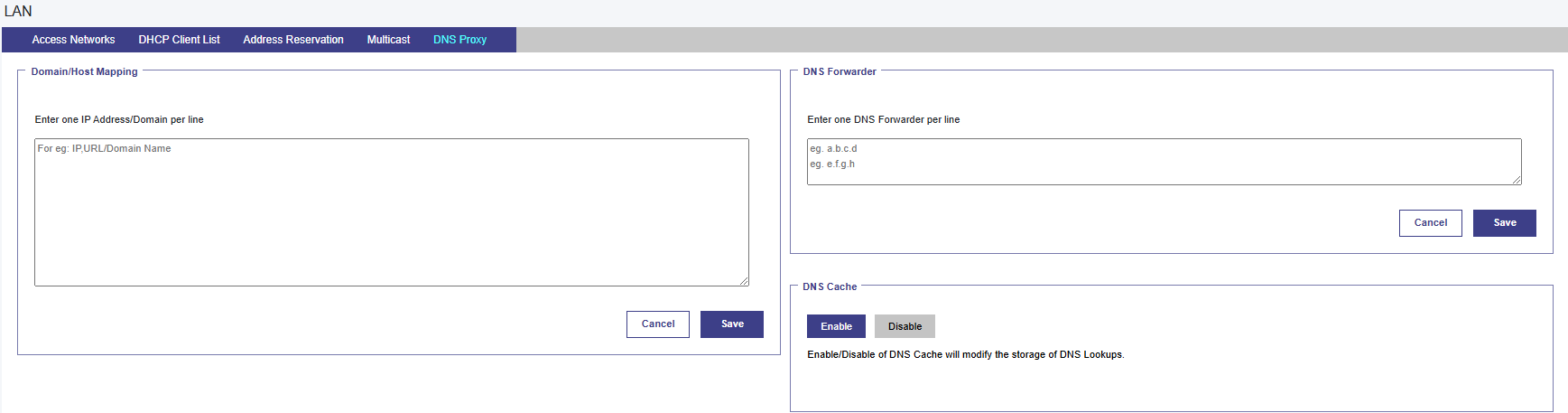
· To enter data in the respective fields, see table below.
|
Fields |
Description |
Configuration |
|
Domain/Host Mapping |
|
Enter an IP address and suffix domain on a single line. Click Save. Or, To configure multiple domains and host mapping, enter the IP address and suffix domain on a distinct line, and perform this step on every line. Or, The user can upload the list of the domain/host mapping also in the Comma Separated Value (CSV) format. For this, click Upload Configuration icon and upload the CSV file. Click Save. |
|
DNS Forwarder |
|
Enter only one DNS forwarder on every line. Click Save. |
|
DNS Cache |
|
To enhance the DNS lookups, click Enable. |
Table DNS Proxy Settings
The DNS proxy is configured.